Audio guide planning
Museum audio guide equipment: 2026 buyer's guide
A buyer's guide to museum audio guide equipment: devices, headphones, triggers, charging, software, accessibility, support and total cost.

Museum audio guide equipment is the system a museum uses to deliver self-guided, group, accessible or immersive audio: visitor devices, headsets, triggers, charging, cleaning, content software, analytics and support. For a procurement team, the question is not which device looks best on a spec sheet. It is which setup fits visitor numbers, languages, accessibility, the building, staff workflow and total cost over several seasons.
This 2026 buyer's guide is for museum directors, operations teams, exhibition producers and procurement staff preparing a request for proposal (RFP). It explains what belongs in scope, which criteria matter, how to think about total cost of ownership, what to ask vendors and where Look2Innovate fits when a museum needs hardware, content workflow, analytics and deployment support in one project.
What museum audio guide equipment includes
Handheld audio players
Handheld audio players are dedicated devices that visitors borrow on site. They remain the safest choice when a museum needs controlled distribution, offline reliability, tactile buttons, long battery life, built-in triggers and a predictable experience for visitors who may not want to use their own phone. A device such as Trend can support 32 languages, more than 100 hours of battery life, keypad entry, IR, RF, RFID, Point & Click, and Buzz & Play triggering.
Multimedia tablets
Multimedia tablets are useful when a tour needs more than sound. A tablet can show maps, images, family-tour interfaces, sign-language video, synchronised media or interactive content. Look 3 is a museum tablet with a 5.5-inch display, Android 14, 128GB storage, a 6000mAh battery, more than 15 hours of continuous use, NFC, GPS, Bluetooth, Wi-Fi, USB-C and infrared communication.
Headsets and earpieces
Headsets and earpieces should not be left until the end. They affect hygiene, comfort, sound leakage, accessibility and replacement cost. Procurement should include headphone type, replacement stock, cleaning process and hearing-aid compatibility where relevant.
Wireless tour guide systems
Wireless tour guide systems are one-to-many systems for live group tours, school groups, guided visits, simultaneous interpretation and staff-led experiences in which one guide speaks to many receivers. They are adjacent to audio guides, but they solve a different visitor problem.
Directional speakers
Directional speakers serve open spaces where headphones would interrupt the installation. They project sound into a controlled zone, such as a small exhibit point, digital display or immersive room, and are usually specified with ceiling height, ambient noise and coverage area in mind.
Trigger infrastructure
Trigger infrastructure is optional. Some museums are better served by a very simple model: put a number beside each stop and let visitors enter that number on the audio guide. That removes installation, calibration and some staff troubleshooting. For a more immersive or hands-free tour, automatic triggers such as IR, RF, RFID, BLE, GPS and NFC can start content in the right place. Simpler alternatives include keypad numbers, touchscreen selection, Point & Click targets and manual playback. In Look2Innovate deployments, IR is usually the most precise choice for exhibit-level stops because it can be aimed at a defined zone. RF can be the more practical choice when a museum needs low-maintenance area triggering: Look2Innovate RF nodes can run for years on two AA batteries, so they can be placed without cabling or a central controller and maintained as local units.
Charging and cleaning racks
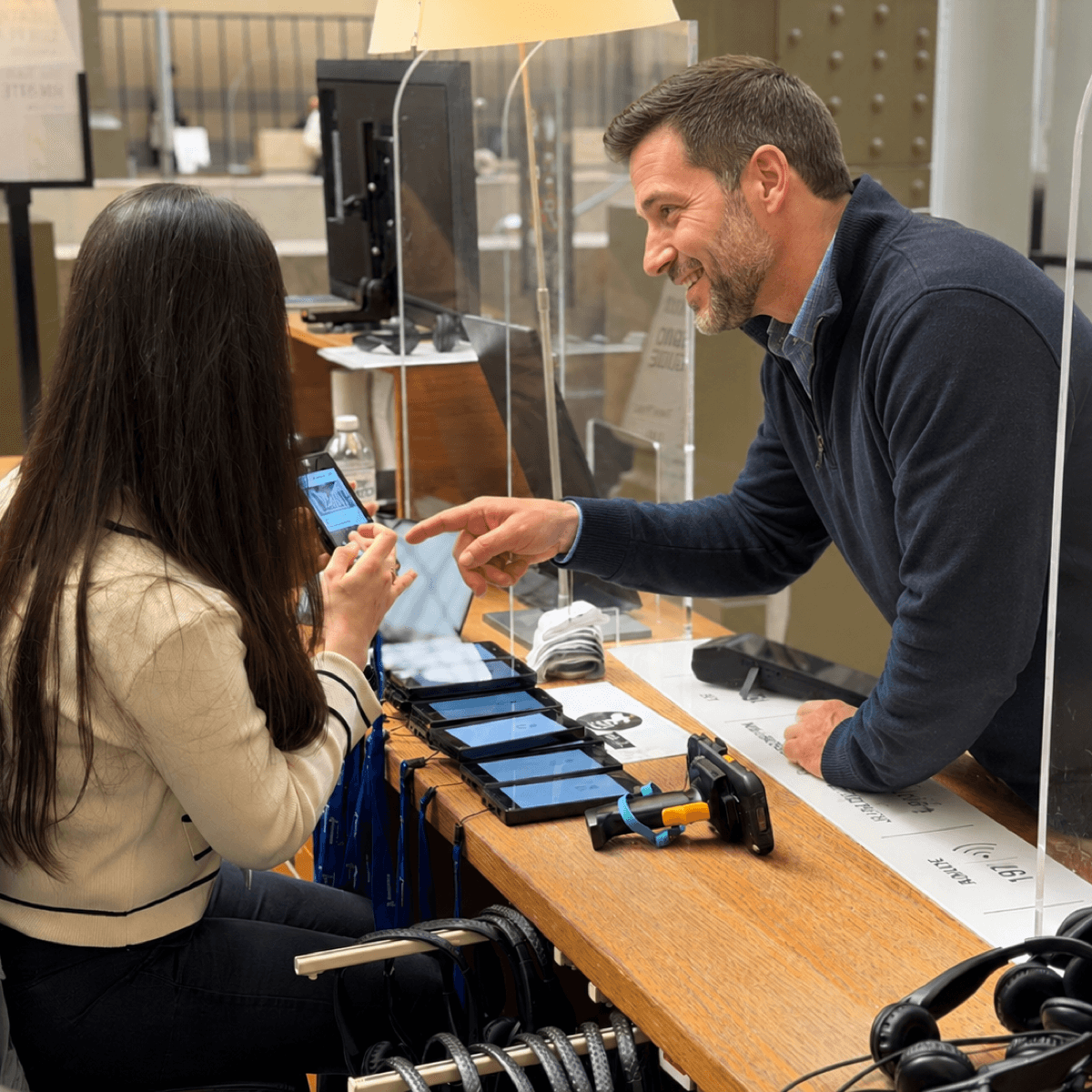
Charging and cleaning racks keep the fleet usable every day. A charging plan should cover device count, returns, battery balancing, content updates, storage and cleaning. Racks are operational equipment, not just accessories.
Content-management software
The CMS should manage scripts, audio, images, language variants, approvals, device sync and analytics, rather than force teams to update every device by hand. It should be easy enough for non-technical staff to correct a stop, add a language or adjust a tour without formal training. The RFP should ask whether updates publish automatically when devices return to chargers, whether staff must touch every unit and whether routine edits require a supplier fee. With Look2Guide CMS, self-service content updates are included, so museums can make ordinary changes themselves.
The ten criteria that should drive the RFP
Battery life
Battery life should be judged by operational battery life and continuous playback time. A device with weeks of real visitor use can reduce daily handling. Continuous-playback hours determine whether a fleet survives busy days. Trend is specified for two months of real-world use and more than 100 hours of continuous playback with fast charging; Look 3 is designed for more than 15 hours of continuous tablet use.
Trigger accuracy
Trigger accuracy should match the building. In Look2Innovate deployments, IR is usually best for precise exhibit-level triggering because it can be aimed at a specific zone. RF can be better where the priority is simple installation and long battery life rather than a sharply bounded beam; Look2Innovate RF nodes can run for years on two AA batteries and do not need a central controller. RFID is useful where targets must be hidden. GPS is normally better outdoors; GPS.gov notes that accuracy depends on receiver quality and surrounding conditions. For metre-level or room-level behaviour, test the actual gallery path before signing the contract.
Languages supported
Language support should be tested as a visitor workflow, not as a number in a brochure. Ask whether the system has a hard language cap, whether visitors can switch language mid-tour, whether one device can hold all tours and what happens when one translation is not ready. For many hardware fleets, 32 languages is enough. Tablets and CMS-led projects can support richer variants.
Accessibility features
Accessibility requirements belong in the first RFP draft. Ask about audio description, hearing-loop-compatible output, volume behaviour, high-contrast screens, tactile keypads, Braille overlays, sign-language video, transcripts, simplified tours, wheelchair-friendly route variants and staff training. For tablet and web interfaces, align with WCAG rather than treating accessibility as a late content add-on.
Content workflow
The vendor should explain who writes, reviews, translates, records, approves and publishes content. The workflow matters because scripts, rights, voiceover, translation, audio description and sign-language video often determine the real launch date. The RFP should also test ordinary updates: who can change a stop, how quickly it reaches the fleet, whether charger sync is automatic and whether the museum pays extra for routine supplier-managed edits.
Cleaning and fleet hygiene
Cleaning should be specified as a staff workflow. Ask how returned devices are separated from ready devices, how headsets are cleaned or replaced, and whether the charging setup makes battery status visible before the next handout period.
Analytics depth
Analytics should answer operational questions, not merely count plays. Useful reports include language uptake, tour completion, stop popularity, dwell-time proxies, drop-off points, fleet use and content-update status. Define each measure and its denominator before comparing suppliers; see what audio guide data can tell a museum.
Integrations
Integrations should be described as productised, custom or not recommended. If the museum has ticketing, CRM, a museum CMS, digital signage, kiosks, synchronised video, video servers or show controllers, ask how the integration is installed, triggered, supported and updated.
Scalability
Scalability is not just maximum device count. It includes seasonal swings, school holidays, charger capacity, replacement stock, content-update speed and whether one operating model can cover several venues or touring exhibitions.
Support and SLA
A serious vendor should state launch-week support, support hours, escalation path, replacement turnaround, training scope, software-update policy and named owners for content, hardware and analytics issues.
Total cost of ownership is more than hardware price
The first-year budget should separate hardware, content production, deployment, staff training, spare units, software licences, freight, installation and project management. The recurring budget should separate content updates, repairs, battery ageing, headphone replacement, cleaning supplies, software renewals, support, storage and seasonal expansion.
| Cost category | Year-one costs | Ongoing costs | Who usually absorbs it |
|---|---|---|---|
| Hardware | Devices, receivers, tablets, headsets, chargers | Repairs, battery ageing, replacements | Museum, vendor or rental contract |
| Content production | Scripts, translation, audio, accessibility formats | New stops, language updates, re-recording | Museum, content partner or vendor |
| Deployment | Installation, testing, logistics, launch support | Seasonal reconfiguration or touring moves | Vendor or rental contract |
| Training | Front-desk, operations and CMS training | New-staff refreshers | Vendor at launch, museum afterwards |
| Staffing and operations | Handout, returns, charging, cleaning, support desk time | Daily handling, content updates and visitor support | Usually the museum |
| Replacement units | Spare devices and accessories | Damage, loss, headphones and emergency swaps | Contract terms decide |
| Software | CMS setup, analytics, integrations | Licences, hosting, support and updates | Vendor, museum or bundled contract |
For comparison, ask vendors to label each line as included, optional, one-off, annual, usage-based or museum-managed. This prevents a low year-one quote from hiding later charges for content changes, software access, headphones, replacement devices or on-site support.
Hardware cost is the easiest line to compare and the easiest to misread. Staffing and content costs often exceed the price of the devices themselves over the life of a project. A cheaper unit can become expensive if it needs daily charging, has weak analytics, lacks reliable triggers or forces staff to update content manually. A dearer fleet can be cheaper over three years if it reduces handling time, supports remote updates and includes spare units, training, maintenance and replacement planning.
Two levers reduce operating cost without making the visitor experience poorer. The first is hardware that needs less daily handling: long battery life, simple controls and visible charging status. A device such as Trend helps because staff spend less time charging, explaining and troubleshooting. The second is content production. AI-generated draft tours can make small projects affordable, though the quality is usually below a professionally written and recorded tour and should still be reviewed by the museum.
Charging infrastructure changes the sums. A 20-slot Smart Charger can charge compatible audio guides, download CMS updates over Ethernet, upload visitor statistics and run sync cycles as often as every ten minutes. It is not just a charging accessory. It can reduce the labour cost of keeping a fleet current.
In Look2Innovate proposals, rent-versus-buy break-even depends on duration, visitor numbers, internal staffing and service risk. Rental usually fits temporary exhibitions, uncertain demand, international touring shows and projects that need logistics and replacement units bundled. Purchase usually fits permanent installations with predictable demand and a team that can manage charging, cleaning, spares and content updates over several years.
Procurement checklist for museum audio guide equipment
Start the RFP by defining the visitor journey, not the device. Write down the expected peak visitor count, average tour length, languages, accessibility formats, route, staffing model, charging location, content owner, launch date and support expectations.
- Map visitor segments.
- Define paid, free and accessible tours.
- Estimate peak simultaneous users.
- Decide on rental, purchase or long-term rental.
- Choose device categories.
- Choose the simplest trigger model that supports the visitor journey.
- Specify language and accessibility requirements.
- Define content production, approval and update rights.
- Plan charging, cleaning and automatic content sync.
- Request analytics and export examples.
- Set SLA and replacement rules.
- Run an on-site pilot before final acceptance.
Fleet sizing should include spares and charging rotation. If 300 visitors may start a 90-minute tour during a busy window, the museum needs enough active devices for that window, enough returned devices ready for the next wave and enough replacements for damage, battery variance, late returns and staff errors. In Look2Innovate deployment planning, a spare allowance of 5-15% is a useful discussion range, but the final number should come from the venue's visitor rhythm.
The pilot should test ordinary operations. Give devices to non-technical staff, check language switching, walk the route with peak ambient noise, try accessible tours, drain and recharge units, update content, clean returned headsets and simulate a broken unit. A demo that works only in a meeting room does not prove that the system will survive the front desk at 10.30am on a school-holiday morning.
Questions to ask audio guide vendors
For hardware, ask which devices are recommended for handheld audio, multimedia, group guiding, accessibility and open-environment sound. Ask for battery life in daily use and continuous playback, storage capacity, drop resistance, headphone options, charging-slot count, charging time, cleaning process, warranty period, spare-unit policy and whether the vendor supports both rental and purchase.
For triggers and integrations, ask which methods are supported natively: IR, RF, RFID, BLE, GPS, NFC, keypad, touchscreen, Point & Click, Buzz & Play, manual start and remote guide-side triggering. Ask what the museum would gain from hands-free triggering, what it would cost to install and maintain, and whether simple numbered stops would serve the visitor just as well. If the museum has ticketing, CRM, a museum CMS, digital signage, kiosks, synchronised video, video servers or show controllers, ask whether integration is productised, custom or not recommended and how playback synchronization is tested.
For content, ask who writes, records, translates, reviews and publishes updates. Ask whether the CMS supports transcripts, images, audio files, versioning, approval roles, language-readiness checks, analytics and remote device sync. Ask whether updates move automatically to devices through the chargers, whether staff can publish changes without training, and whether routine updates are included or billed as supplier work. If AI tools are offered, ask where generation runs, whether museum scripts are used for training and how human review happens before publication.
For support, ask what happens during launch week and during a failure three months later. Good answers include on-site setup where needed, staff training, documented handout and return workflows, replacement turnaround, support hours, escalation paths, software-update policy and named owners for content, hardware and analytics issues.
Common procurement mistakes
The first mistake is over-specifying language support before checking visitor data. A museum may ask for 40 languages but need only eight at launch, plus a clean workflow for adding more. The fix is to separate launch languages from future language capacity and content-production budget.
The second mistake is ignoring battery balancing in fleet sizing. A fleet that looks large enough can still fail if too many units return half-charged or if staff cannot see which units are ready. The fix is to include charging racks, status checks, rotation rules and spare devices in the operating plan.
The third mistake is treating content production as an afterthought. Hardware can be deployed quickly, but scripts, rights, voiceover, translation, audio description, sign-language video and approvals often determine the real launch date. The fix is to assign content owners and approval gates before hardware delivery.
The fourth mistake is overcomplicating the visitor journey. A museum may not need hands-free triggering, Bluetooth beacons or a multimedia interface. In many venues, simple numbered audio guides, sometimes used without headphones, are the most intuitive choice because visitors understand them quickly and staff have less to manage.
The fifth mistake is leaving accessibility until installation. Accessible tours affect device choice, route design, labels, staff training and CMS structure. The fix is to specify accessible formats, routes and device needs before installation.
The sixth mistake is signing a contract without replacement-unit terms. Every public fleet needs a clear plan for damage, loss, battery ageing, headphones, chargers and emergency swaps. The fix is to define spare units, swaps and replacement responsibilities in the contract.
Where Look2Innovate fits
Look2Innovate fits projects in which the museum wants more than isolated hardware. One deployment can combine dedicated audio guides, Look 3 tablets, tour guide systems, directional speakers, chargers, cleaning, CMS workflows, content production, analytics and support. That makes the system easier to specify when procurement needs one answer for visitor experience, back-of-house handling and long-term maintenance.
Examples include Tutankhamun: His Tomb and His Treasures, Musée d'Orsay, The National Gallery, and Casa Batlló. Each has different visitor flow, content, accessibility, language and operational needs. That is why equipment should be specified as a system, not as a shopping list of devices.
FAQ
What is the minimum fleet size that makes sense?
There is no universal minimum. A dedicated fleet starts to make sense when the museum has predictable on-site demand, paid audio-guide uptake, accessibility requirements or visitors who cannot rely on their own phones. For very small sites, start from peak simultaneous users plus a spare allowance of 5-15%.
How long does a typical audio guide deployment take?
A simple hardware-and-content update can be ready in weeks. A multilingual, accessible, triggered or multimedia deployment can take several months because scripts, translation, recording, route testing, staff training and installation all need approval.
Can we mix rental and owned units?
Yes. Some museums buy a baseline fleet for permanent demand and rent extra units for temporary exhibitions, school holidays, international shows or launch periods. The important point is to keep content, charging, support and analytics workflows consistent across both groups.
Do you train our staff or do we?
For professional deployments, the vendor should train the museum team on handout, return, charging, cleaning, troubleshooting, content updates, analytics and replacement workflows. Staff can also be provided through local partners, such as distributors, who often help with on-site support, repairs and escalation. The museum should still appoint internal owners for daily operation and content approval.
What happens to our content if we change vendors?
Ask this before signing. The museum should retain usable scripts, translations, rights documentation, audio masters where contractually agreed, image assets, transcripts and metadata. Device-specific programming may not transfer, but the intellectual content should not be locked inside a hardware fleet.
Should a museum choose dedicated devices or visitor phones?
Dedicated devices are stronger when the museum needs controlled distribution, offline reliability, accessibility hardware and consistent visitor behaviour. Visitor phones can work well for lightweight guides, broad access or post-visit engagement, but they depend more on signage, connectivity, battery, personal comfort and headphone availability.
Do we need hands-free triggering?
Not always. Hands-free triggering can make a tour feel more immersive, but it adds infrastructure, testing and maintenance. Many museums get a better result from simple numbered stops on dedicated audio guides, especially when staff time is tight and visitors need an experience that is obvious without explanation.